Guides / Metadata over Folders: The Better Way to Organize Your Documents
Metadata over Folders: The Better Way to Organize Your Documents
Discover why document management systems use metadata instead of folders, and how this approach transforms the way you organize and find documents.
Introduction
Plenty of people — and plenty of organisations — never use a document management system at all. They keep every file in a tree of folders, and for everyday work it mostly holds up.
This article is about where it stops holding up: the limits you run into when folders are your only tool, and what a document management system does instead.
The problem isn’t that folders are wrong — it’s that they’re too rigid for the way documents actually work. Document management systems (a DMS, for short) have found a better approach: describing documents with metadata instead of filing them into folders.
Where Folders Fall Short
The Rigid-Order Problem
When you picture a receipt in your head, you might think: a receipt for €35.49, from Rewe, dated April 1st. Or you might think: an April 1st receipt from Rewe for €35.49. Same receipt — you just listed the facts in a different order, and it made no difference.
Folders don’t allow that freedom. You have to pick an order and commit to it.
You can file receipts as Vendor / Year:
Rewe/
├── 2024/
│   ├── receipt-1.pdf
│   └── receipt-2.pdf
└── 2025/
    ├── receipt-3.pdf
    └── receipt-4.pdf
Aldi/
├── 2024/
│   ├── receipt-5.pdf
│   └── receipt-6.pdf
└── 2025/
    ├── receipt-7.pdf
    └── receipt-8.pdf
…or as Year / Vendor:
2024/
├── Rewe/
│   ├── receipt-1.pdf
│   └── receipt-2.pdf
└── Aldi/
    ├── receipt-5.pdf
    └── receipt-6.pdf
2025/
├── Rewe/
│   ├── receipt-3.pdf
│   └── receipt-4.pdf
└── Aldi/
    ├── receipt-7.pdf
    └── receipt-8.pdf
Same information, two completely different structures — just because we swapped the order. And notice we’ve left the amount out entirely, because you’re obviously not going to create a folder for every possible total.
The takeaway: a folder tree is not a natural home for a document that carries several facts at once, such as a vendor and a year.
Still not convinced? Think about an invoice, which has both an issue date and a payment deadline — two dates and one vendor. File that by year and you immediately have to remember which of the two dates the folders stand for. From the document’s point of view the order of its facts (vendor, issue date, deadline) doesn’t matter at all. The folder structure forces an order on you anyway, and then makes you keep track of it.
The Many-Values Problem
Imagine you use software that produces weather reports as PDFs, and you need to keep those PDFs somewhere outside the software.
A single weather report holds a lot of individual readings:
- Temperature (°C): 32
- Humidity (%): 60
- Wind (km/h): 20
Every report has different numbers. Faced with this, most people squeeze the values into the file name:
Weather Reports/
├── wr-w237-hum0449-dt2260105-rain45.pdf
├── wr-w342-hum0103-dt2260106-rain31.pdf
└── wr-w557-hum0103-dt2260107-rain99.pdf
You are trying to store the document’s information in its name. It sort of
works, but it’s clunky, hard to read, and almost impossible to search. It
falls apart the moment you need to find documents by more than one value at
once. How would you pull up every weather report with temperature > 25
and humidity < 60 and wind > 20?
How Document Management Systems Work Differently
So if folders are the problem, what’s the solution? Every DMS tackles it a little differently, but the common idea is the same: instead of filing a document, you describe it — with metadata, and usually with categories on top of that.
What Is Metadata?
Metadata is just a fancy word for facts about a document. For an invoice, the metadata might be:
- Vendor: Rewe Group
- Issue date: 2024-04-01
- Due date: 2024-05-01
- Total amount (EUR): 35.49
- Status: Paid
For one of those weather reports, it would be:
- Date: 2026-01-05
- Temperature (°C): 32.1
- Wind speed (km/h): 1.2
- Humidity (%): 44.9
- Chance of rain (%): 45
What Are Categories?
A category is simply a named group of metadata fields that belong together. Every document in a category shares the same set of fields.
For example, we could sort the fields above into two categories:
Category: Business Contract
- Counterparty
- Department
- Status
- Issue date
- Expiry date
Category: Invoice
- Vendor
- Total amount (EUR)
- Issue date
- Due date
Why the Metadata Approach Wins
Order doesn’t matter
Metadata doesn’t care about order. Filtering by Vendor = Rewe and
Issue date > 2026-01-01 and Expiry date < 2029-01-01 gives you exactly
the same result as listing those three conditions in any other order. It’s the
same when you fill in values or set up the fields in the first place — there’s
no sequence to get right.
Many values stay simple
Whether a document has 5 fields or 20 makes no difference — not to how you search for it, and not to how you store it. Metadata is simply a natural fit for documents.
Reorganizing costs nothing
Changing a folder structure is a real chore. With metadata there’s nothing to
restructure. Decide you want to track documents by vendor? Start filling in a
Vendor field. Your existing documents don’t move and don’t break — you’ve
simply given yourself a new way to look at them.
It matches how you think
When you think about a document, you think about it in several ways at once:
- “That invoice from Acme Corp”
- “The Q3 expense report”
- “That document I signed in June”
- “The contract we’re still waiting on”
Metadata lets you describe documents exactly the way you’d describe them to a colleague. Each field is just one piece of what the document is.
Before and After
This article isn’t about any one document management system — it’s about an idea they all share. Metadata is the defining feature of any DMS — take it away and what’s left isn’t really a DMS.
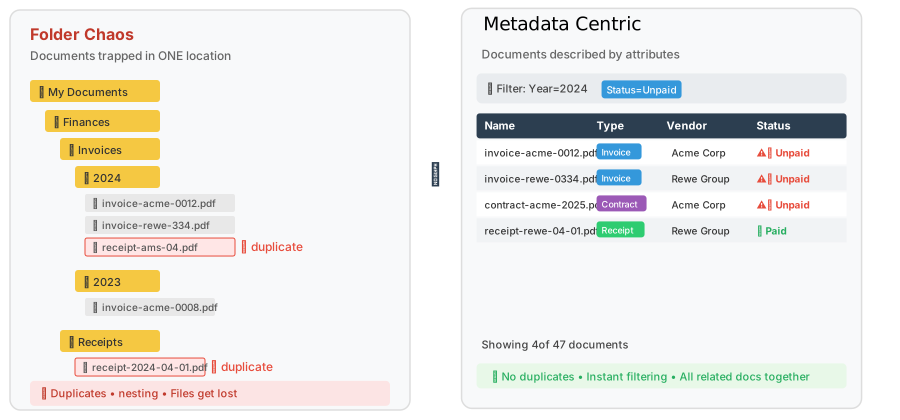
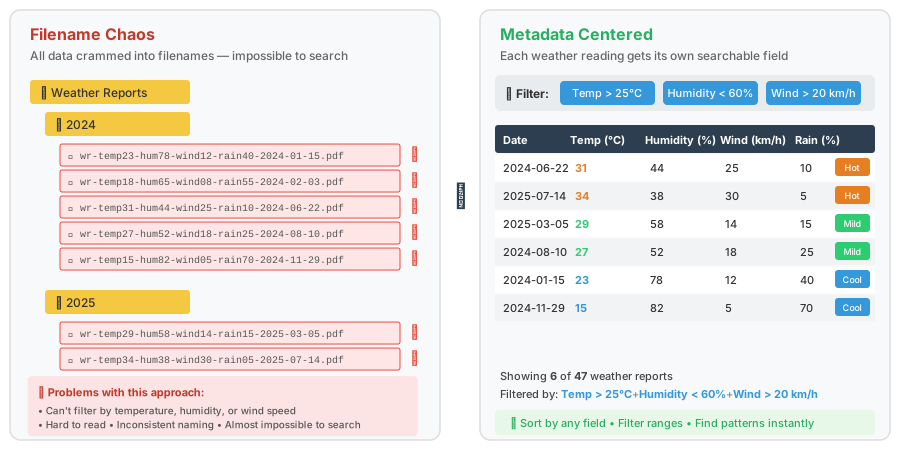
To make the difference concrete, here is how the two approaches feel side by side. The system in the pictures is a generic stand-in — every real DMS looks a little different — but the contrast is what matters.
Invoices, receipts and contracts
Notice how naturally the metadata view reads: it lays each document out the way you would describe it out loud.
Weather reports
Notice how easy it is to filter the reports once every reading has its own field.
The Bottom Line
Folders aren’t going anywhere, and for a lot of everyday organising they are perfectly fine. It’s just worth knowing where they run out of road — and that you don’t have to stop there.
Metadata lines your documents up with the way you already think about them. It’s more flexible, and it makes finding the right document feel natural instead of fiddly.
Ready to see it in action? That’s exactly what a document management system is built for.